Worley Noise
2026-02-20
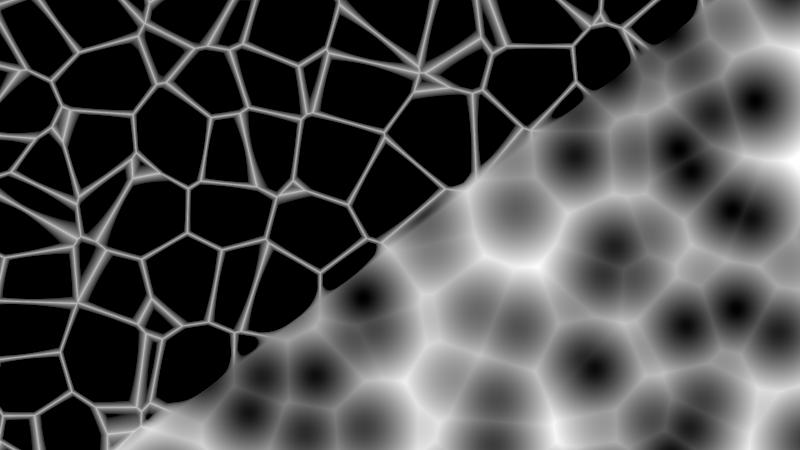
Overview
Worley noise (also called cellular or Voronoi noise) works by scattering random points across a grid and measuring how close each pixel is to its nearest neighbours. The result is that organic cell-like pattern you see in nature, skin, stone, foam, water surfaces.
This implementation runs entirely on the GPU via Blinkscript with no input required.
My first kernel that used a 3D hash for animation — Z which is time in this case makes cells evolve in place instead of sliding.
Result Preview
The Algorithm
Feature points and neighbourhood
The image is divided into a grid of unit cells. Each cell gets one feature point
placed at a random but stable position via hash3(). hash3() is a pseudo random
hash that chains dot → sin → fract to scramble a cell coordinate into a value
that looks random but is fully deterministic, so the same cell always produces the
same feature point.
For each pixel the kernel scans a 3×3×3 neighbourhood around it, 27 cells in total, and tracks the two closest distances, F1 and F2. These are the classic Worley distances to the nearest and second nearest feature points.
Initial distances and clamping
Both F1 and F2 start at 10.0f before the search begins, a value large enough that
the first real distance always wins and replaces it. You could initialise with 1.0f
instead, but if you push the scale low enough, you get more smaller cells and
distances can exceed 1.0f. At that point F1 never updates and the output clips
to white. 10.0f is the safe option, while 0.0f will just give you a black screen.
Scale control - Simillar to Nukes Noise Scale
To determine the size of our cells, we divide our pixel coordinates by the scale parameter:
float3 p = float3(px, py, zmove) / scale;
Higher Scale = larger, more spread.
Lower Scale = smaller,denser cells.
A common pattern
This initialise and minimise pattern is not unique to Worley noise. Any algorithm that searches for a minimum needs a starting value to compare against, for example, raymarching, pathfinding, and ofc nearest neighbour.
Distance Modes
- Euclidean — round, organic cells
- Manhattan — angular, diamond-shaped cells
- Chebyshev — square cell boundaries
Return Types
- F1 — distance to the closest point, the standard Worley look
- F2 — distance to the second closest point
- F2 - F1 — sharp cell borders, good for cracks or veins
- F1 + F2 — soft blended mix of both
Video explaining more about cellular noise.
This is what i’ve learnt this far does not mean its correct.- Not me in the Video either.
Blinkscript Code
// WorleyNoise — Cellular / Voronoi
// Distance Type:  0=Euclidean  1=Manhattan  2=Chebyshev
// Return Type:    0=F1  1=F2  2=F2-F1  3=F1+F2

kernel WorleyNoise : ImageComputationKernel<ePixelWise> {
  Image<eWrite, eAccessPoint> dst;

  param:
    float scale;
    float zmove;
    int   pixelSize;
    int   distanceType;
    int   returnType;

  local:
    void define() {
      defineParam(scale,        "Scale",         1.0f);
      defineParam(zmove,        "Z Move",        0.0f);
      defineParam(pixelSize,    "Pixel Size",    1);
      defineParam(distanceType, "Distance Type", 0);
      defineParam(returnType,   "Return Type",   0);
    }

    // fract does not exist in blinkscript, unless I've missed it and it has another name.
    // But we can get around it by creating it ourselves.
    float fract(float x) { return x - floor(x); }

    float3 fract3(float3 p) {
      return float3(fract(p.x), fract(p.y), fract(p.z));
    }

    // places a stable random point inside each cell
    // dot → sin → fract: same input always gives same output
    float3 hash3(float3 p) {
      float3 q = float3(
        dot(p, float3(127.1f, 311.7f,  74.7f)),
        dot(p, float3(269.5f, 183.3f, 246.1f)),
        dot(p, float3(113.5f, 271.9f, 124.6f))
      );
      return fract3(sin(q) * 43758.5453f);
    }

    // Euclidean=round, Manhattan=diamond, Chebyshev=square
    float calcDist(float3 d, int type) {
      if      (type == 0) return sqrt(d.x*d.x + d.y*d.y + d.z*d.z);
      else if (type == 1) return fabs(d.x) + fabs(d.y) + fabs(d.z);
      else                return max(max(fabs(d.x), fabs(d.y)), fabs(d.z));
    }

    // searches all 27 neighbours, keeps the two closest distances
    void cellularF(float3 p, float &F1, float &F2) {
      float3 cell   = floor(p);
      float3 frac_p = p - cell;

      F1 = 10.0f;
      F2 = 10.0f;

      for (int z = -1; z <= 1; z++) {
        for (int y = -1; y <= 1; y++) {
          for (int x = -1; x <= 1; x++) {
            float3 neighbor     = float3(x, y, z);
            float3 featurePoint = neighbor + hash3(cell + neighbor);
            float3 diff         = featurePoint - frac_p;
            float  dist         = calcDist(diff, distanceType);

            if (dist < F1) { F2 = F1; F1 = dist; }
            else if (dist < F2) { F2 = dist; }
          }
        }
      }
    }

  void process(int2 pos) {
    // pixelSize > 1 = give a pixel styled look
    //int    px = (pos.x / pixelSize) * pixelSize;
    //int    py = (pos.y / pixelSize) * pixelSize;

    int    px = pos.x;
    int    py = pos.y;

    // Divide by scale so higher values = larger, fewer cells.
    float3 p  = float3(px, py, zmove) / scale;

    float F1, F2;
    cellularF(p, F1, F2);

    // F2-F1 gives sharp cell borders, good for cracks/veins
    float noise;
    if      (returnType == 0) noise = F1;
    else if (returnType == 1) noise = F2;
    else if (returnType == 2) noise = F2 - F1;
    else                      noise = F1 + F2;

    dst() = float4(clamp(noise, 0.0f, 1.0f));
  }
};